How to Set Up Polygon Geofences: A Fleet Manager's Step-by-Step Guide
Picture this: a delivery driver pulls up outside a customer's building, but your geofence doesn't register the arrival because their site sits just outside a circular boundary that never quite matched the property's actual shape. Multiply that across dozens of sites, and you end up with false alerts, missed arrival notifications, and time tracking data nobody quite trusts.
This is the everyday reality for fleet managers relying on basic circular geofences. Real locations aren't circles. Depots have irregular access roads, customer sites sit on oddly shaped plots, and construction zones shift boundaries as work progresses.
Polygon geofencing solves these problems by letting you draw exact boundaries that match real locations. Here's how to set them up properly to get accurate results from day one.
Why Polygon Boundaries Work Better
Most fleet tracking systems default to circular geofences. You pick a centre point, set a radius, and hope it covers the right area. The reality? Your depot isn't circular. Customer sites have irregular shapes. Construction zones change constantly.
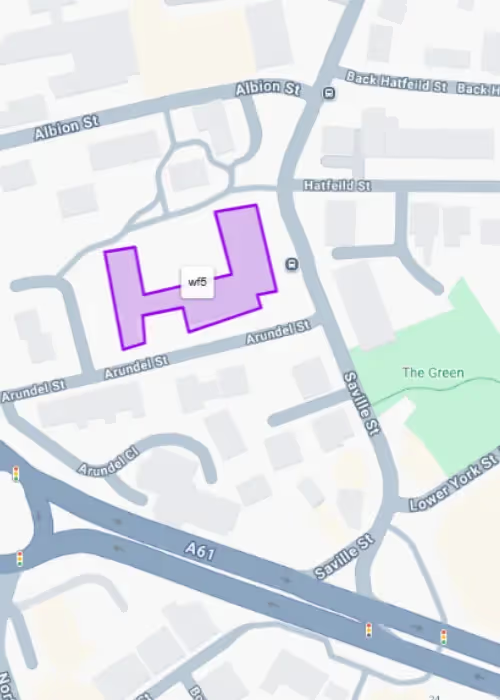
Polygon geofences follow property lines, building edges, and access routes exactly. You monitor only the areas that matter to your operation, eliminating false alerts from neighbouring businesses or public roads.
Industrial estates, construction sites, and commercial premises rarely fit neat circles. Custom boundaries deliver the accuracy fleet managers need for reliable data.
The Setup Process: Keep It Simple
Setting up polygon geofences doesn't require technical expertise. At RAM, we keep it simple:
- Start with clear naming: Use descriptive names that tell you the location and purpose immediately. "CustomerABC-Loading" works better than "Zone 1" when you're managing dozens of boundaries.
- Choose your colours wisely: Consistent colour coding makes live monitoring much easier. Red for restricted areas, blue for customer sites, green for company locations. Your team will thank you later.
- Draw precise boundaries: Zoom in close before placing points. Follow fence lines, building edges, and property boundaries. Include all vehicle access points; missing a side gate creates monitoring gaps.
The key is starting simple. Pick your five most important locations first. Master the basics before expanding to additional sites.
Advanced Setup Techniques
Once you've mastered basic boundary drawing, these strategies help you get maximum value from your geofencing system:
- Layer your monitoring: Create multiple geofences around critical locations. A large boundary gives early arrival warnings. A smaller, precise boundary confirms actual entry. Security zones get their own tight boundaries for high-value equipment.
- Monitor routes, not just destinations: Draw corridor-style geofences along approved access roads. Catch unauthorised shortcuts and route deviations that could indicate problems.
- Plan for changes: Construction sites evolve. Customer access points change seasonally. Set up quarterly reviews to keep boundaries current rather than dealing with outdated alerts.
Common Setup Mistakes That Cost Time
Avoid these four mistakes that create ongoing problems and waste your team's time:
- Overcomplicating boundaries: Simple shapes work better than complex polygons with dozens of points. GPS accuracy has limits, and overly detailed boundaries can create system performance issues.
- Including public roads: Unless you specifically need route compliance monitoring, avoid public highways in your boundaries. Passing traffic creates false alerts that waste time.
- Forgetting GPS buffer zones: Make boundaries 10-15 meters larger than the minimum area. GPS accuracy varies with weather, buildings, and satellite positions.
Poor naming from the start: "Site 1" and "Zone A" become meaningless when you're managing 50+ geofences. Establish clear naming conventions before creating multiple boundaries.
Getting Alerts That Matter
The best geofence is useless if alerts go to the wrong people or arrive too late. Set up different notification recipients for different zones. Fleet managers need security alerts immediately. Customer service teams need job completion notifications. Billing teams need accurate time tracking data.
Automatic customer notifications can transform your service delivery. When properly configured, geofencing can send arrival alerts to customers and provide accurate ETAs, as we explore in our guide on geofencing and customer service.
You can also set up minimum dwell times to avoid false alerts from brief stops. A 5-minute threshold works for most applications. This is long enough to confirm genuine visits, but short enough for timely notifications.
Beyond Basic Monitoring
Polygon geofencing becomes even more valuable when integrated with other business systems and processes:
- Compliance monitoring: Environmental zones like ULEZ and CAZ areas need precise mapping. Polygon boundaries follow official zone maps exactly, helping manage compliance costs and vehicle replacement planning.
- Customer communication: Automatic arrival notifications improve customer satisfaction. Geofence triggers can send SMS or email updates when service vehicles approach.
- Automated timesheets: Entry and exit data feeds directly into payroll systems, eliminating manual logging and reducing administrative overhead.
ROI Through Accuracy
Polygon geofencing typically pays for itself through improved billing accuracy alone. Precise time tracking eliminates disputes about invoiced hours. Automated reporting reduces administrative costs. Better route compliance saves fuel and reduces vehicle wear.
The investment in proper setup delivers ongoing returns through more accurate data, fewer false alerts, and streamlined operations.
Getting Started
Quality polygon geofencing requires the right system and proper setup. At RAM, we offer:
- Easy boundary drawing tools
- Flexible notification options
- Integration with vehicle tracking and fleet management systems
- Reliable GPS accuracy and alert delivery
Most importantly, we offer setup support and training for you and your drivers. The best features don't help if you can't use them effectively.
Ready to see how polygon geofencing works in practice? Book a demo to discover how RAM's advanced geofencing capabilities can improve your fleet's accuracy and efficiency.
Frequently Asked Questions About Fleet Geofencing
What is fleet geofencing?
Fleet geofencing creates virtual boundaries around real-world locations for vehicle tracking. When your vehicles enter or exit these defined areas, the system sends automatic notifications to help monitor fleet operations.
How accurate is GPS geofencing for vehicles?
GPS accuracy for fleet geofencing depends on signal quality and environmental conditions. Most vehicle tracking systems provide reliable boundary detection for fleet management purposes.
Can I set up multiple geofences for different vehicles?
Yes, you can create multiple geofences and assign them to specific vehicles or groups within your fleet management system.
What's the difference between circular and polygon geofencing?
Circular geofencing uses a centre point and radius, while polygon geofencing allows custom shapes that follow exact property boundaries for more precise fleet tracking.
How much does fleet geofencing cost?
With RAM, polygon geofencing is included in Core and Plus packages at no additional cost, making it an affordable fleet management solution.
Can geofencing help with fleet compliance?
Yes, fleet geofencing helps monitor vehicle movements in restricted areas, ULEZ zones, and other compliance-sensitive locations for better fleet management.
How quickly do geofencing alerts work?
Geofence alerts are sent when boundary crossings occur, providing real-time notifications for fleet monitoring purposes.
What reports can I generate from geofencing data?
Fleet geofencing systems typically provide reports on vehicle arrival times, departure times, and duration spent at geofenced locations for comprehensive fleet tracking analysis.
About the author
Richard Blown is Chief Technology Officer at RAM, where he leads product innovation and technical strategy.
With over 25 years of experience in fleet telematics and connected vehicle technology, Richard has pioneered solutions that bridge the gap between theoretical safety improvements and practical business benefits.
His hands-on approach to product development ensures RAM's solutions solve real-world problems faced by fleet operators across the UK and North America.
Reduce costs, improve visibility, and keep your business running efficiently with RAM solutions.